


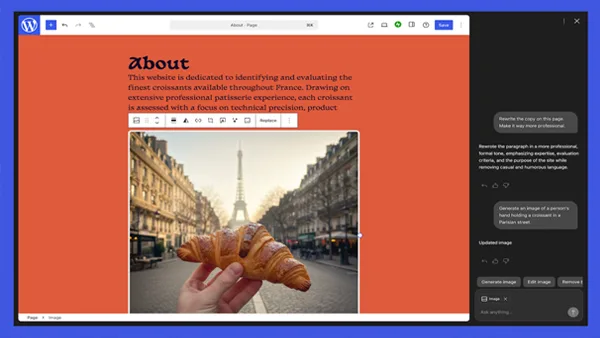
WordPress, the hosting service operated by Automattic, has introduced a built-in AI assistant designed to help users manage and customize their websites through natural language commands.
The new AI feature works directly within a site’s editor, analyzing its structure and content to apply changes in real time. Site owners can request layout or design updates using conversational prompts rather than technical instructions. For example, users can ask the assistant to make a section appear more modern, adjust color schemes to be brighter, or suggest cleaner font styles. The updates are instantly reflected as the changes are made.
Beyond styling tweaks, the assistant can also modify page structure. Users can instruct it to add new sections such as contact pages or testimonials. However, the functionality currently supports block-based themes only; sites using classic themes will not have access to the AI tool within the editor.
Content editing is another key capability. The assistant can rewrite text to match a desired tone, translate sections into other languages, and refine website copy. Integrated into the collaborative block editor introduced in WordPress 6.9, users can activate the AI within shared editing sessions by typing “@ai” followed by their request. The system can suggest headlines, provide grammar improvements, and even reference external sources where applicable.
For visual content, the assistant incorporates image-generation and editing capabilities powered by Google’s Gemini Nano Banana models. A new “Generate Image” option in the Media Library enables users to create or modify images by specifying details such as style, composition, or aspect ratio.
The AI assistant is optional and must be manually activated through a site’s settings panel under the “AI tools” section. However, customers who build a site using WordPress.com’s AI website builder will have the assistant enabled by default.
With this launch, WordPress.com is expanding its AI-powered toolkit, aiming to simplify website creation and management for users of all experience levels.

