


Opera Refreshes Android Browser With New Design, Live Football Hub and Enhanced Personalization Features!
Opera has rolled out a major update to its Android browser, introducing a redesigned start page, improved personalization options, and a dedicated football hub aimed at helping users follow live matches and tournament action directly from their mobile devices.
The update arrives as global interest in international football reaches a peak, with Opera seeking to position its browser as both a web gateway and a real-time information platform. The new football hub provides users with instant access to live scores, match statistics, team standings, and important game updates without requiring them to visit separate sports websites or apps.
At the center of the new feature is a live-match carousel that displays ongoing fixtures and scores in real time. Users can tap individual matches to view detailed statistics, lineups, and key moments. Fans can also select their favorite national teams or clubs and receive notifications for goals, major match events, kickoffs, halftime updates, and final results.
Opera says the football experience is designed to make it easier for users to stay connected to tournaments and competitions while browsing the web. The feature is available in both the standard Opera browser and Opera Mini, extending coverage to users who prefer a lightweight browsing experience or operate on limited mobile data connections.
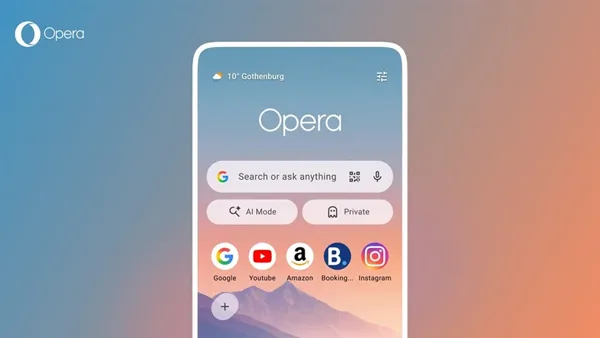
Beyond sports coverage, the Android browser’s home page has undergone a visual overhaul. The refreshed design focuses on faster access to frequently used tools while maintaining Opera’s customizable interface. A new weather widget now appears on the start page, giving users a quick snapshot of current conditions and forecasts based on their location.
The update also introduces streamlined shortcuts that allow users to instantly launch private browsing sessions or access Opera’s built-in AI assistant tools. These additions reflect the growing trend among browser developers to integrate AI-powered features directly into the browsing experience, reducing the need for separate applications.
Customization remains a key focus of the redesign. Users can personalize the appearance of their speed dial shortcuts with multiple shape options, including square, circular, and rounded “squircle” designs. The changes aim to provide a more modern and visually appealing interface while allowing users to tailor the browser to their preferences.
The latest release is part of Opera’s broader strategy to differentiate itself in the highly competitive mobile browser market. While larger rivals continue focusing on search, security, and AI integration, Opera has increasingly emphasized built-in content hubs, productivity tools, and personalized experiences designed to keep users engaged within the browser ecosystem.
As mobile browsing continues to evolve beyond traditional web navigation, features such as live sports tracking, AI-powered assistance, and customizable dashboards are becoming important differentiators. With this update, Opera is betting that users want a browser that serves as a central hub for information, entertainment, and everyday digital activities rather than simply a tool for accessing websites.
The update is being rolled out to Android users globally and is expected to reach all supported devices through the Google Play Store in the coming days.

