


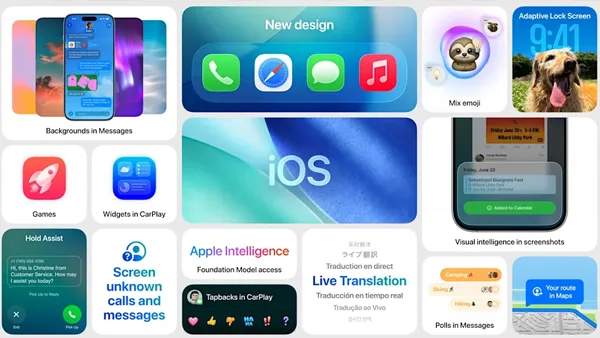
Apple is all set to launch its next major iPhone operating system this fall, officially naming it iOS 26 a noticeable leap in numbering that hints at a significant update. One of the most eye-catching elements of the new OS is the Liquid Glass design, which introduces a modern and polished visual upgrade, marking one of the biggest interface overhauls in recent years.
Users can now try the public beta of iOS 26, released today, to experience the new features firsthand. But before diving in, there’s one important question many are asking: Will my iPhone support iOS 26?
Older Models Lose Support This Year
Unlike the previous year, Apple has decided to end software support for some of its older devices. Three iPhone models released in 2018 will not be eligible for the iOS 26 update:
- iPhone XR
- iPhone XS
- iPhone XS Max
These models join the iPhone X and iPhone 8 lineup, which were dropped from support last year.
iPhones That Will Support iOS 26
All iPhone models launched in 2019 and later will support iOS 26. Here’s the full list of compatible devices:
- iPhone SE (2nd generation and newer)
- iPhone 11, 11 Pro, 11 Pro Max
- iPhone 12, 12 mini, 12 Pro, 12 Pro Max
- iPhone 13, 13 mini, 13 Pro, 13 Pro Max
- iPhone 14, 14 Plus, 14 Pro, 14 Pro Max
- iPhone 15, 15 Plus, 15 Pro, 15 Pro Max
- iPhone 16e, 16, 16 Plus, 16 Pro, 16 Pro Max
Though the upcoming iPhone 17 series is yet to be officially unveiled, it is expected to ship with iOS 26 pre-installed.
What If Your iPhone Isn’t Eligible?
If your device isn’t on the compatibility list, you can continue using it—but with limitations. Older phones that don’t receive iOS 26 will no longer get important security updates, increasing vulnerability to threats. You may also find that some apps stop working over time, as developers typically optimize for newer versions of iOS. Plus, you’ll miss out on all the latest features.
Expected Release Timeline
Apple typically releases its new iOS versions in mid-September, ahead of the annual iPhone launch. Last year, iOS 18 rolled out on September 16. A similar release window is expected for iOS 26, with a final date likely confirmed during the iPhone 17 launch event, anticipated in early September.
Highlight Features in iOS 26
1. Liquid Glass UI:
This major redesign brings a sleek, modern look with translucent elements, floating buttons, dark mode app icons, and a unified aesthetic across all Apple platforms.
2. Redesigned Phone App:
Navigating calls becomes easier with a consolidated screen that includes contacts, recent calls, and voicemails. A new Hold Assist feature will alert you when a customer service agent is ready to speak—no more waiting through long hold music.
3. Live Translate:
You can now communicate in real-time with someone who speaks another language, whether by call or text, thanks to Live Translate.
4. Polls in Messages:
Group chats just got more organized. With the new poll feature in the Messages app, users can vote on decisions—like where to eat—without spamming the thread with dozens of replies.

